OCI pull-through: consume upstream images through hort
Operator goal: Route OCI image pulls through hort, with upstream mappings managed as declarative configuration. Requires a reachable registry endpoint, upstream egress, a configured storage backend, and suitable permissions and scan/quarantine policies.
1. Declare the repository and upstream
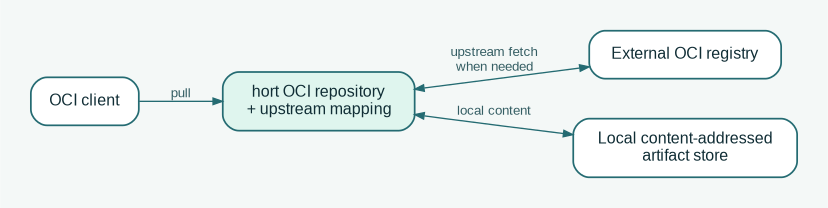
For OCI mirror paths, an OCI repository can be combined with explicit UpstreamMapping resources. Declare both the repository and the mappings in your version-controlled configuration. Choose the repository name and mapping prefixes for your installation.
For example, first declare the hosted OCI mirror repository. This is the same supported layout used in the existing OCI mirror integration scenario: a hosted OCI repository plus explicit upstream mappings. Storage is inherited from the deployment's global CAS configuration.
apiVersion: project-hort.de/v1
kind: ArtifactRepository
metadata:
  name: oci-mirror
spec:
  name: "OCI upstream mirror"
  format: oci
  type: hosted
  isPublic: true
  replicationPriority: local_only
Then add the GHCR mapping as a separate file (or YAML document). Public access is illustrative; for a private mirror, set isPublic: false and configure the necessary scoped grants for consuming identities.
apiVersion: project-hort.de/v1
kind: UpstreamMapping
metadata:
  name: oci-mirror-ghcr
spec:
  repository: oci-mirror
  pathPrefix: ghcr/
  upstreamUrl: https://ghcr.io
  auth:
    type: bearer_challenge
This mapping references the declared oci-mirror repository. Ensure that hort can reach GHCR over HTTPS and that the deployment-level storage is available. The mapping is what selects the upstream for the ghcr/ path; pathPrefix is not a stand-alone repository or a local filesystem path.
2. Validate, apply and verify
HORT_CONFIG_DIR="$PWD/config" hort-server validate-config --strictAfter code review, deploy the files and restart hort-server. Applying a file is not a live reconciliation loop. Verify the repository using an appropriately authorized admin request; check the repository status and server startup logs for successful application.
3. Pull an image with an OCI client
For a trusted HTTPS registry endpoint, a GHCR pull path could look like this:
REGISTRY_HOST=hort.example.com       # omit https://
REPO_KEY=oci-mirror
skopeo copy \
  "docker://$REGISTRY_HOST/$REPO_KEY/ghcr/oci-playground/hello-world:latest" \
  "oci-archive:./hort-ghcr-image.tar"
The same path can be used with another OCI client, if its authentication and TLS trust are configured. If repository reads require authorization, log in using the configured registry authentication mechanism first. You can define additional mappings with distinct prefixes when appropriate for your upstreams.
4. Verify proxy behavior
Inspect the pulled artifact, confirm the repository request in hort and repeat the pull. With a valid read_metrics bearer for the separate admin metrics listener, check hort_upstream_fetch_total{result="success"}: compare the counter before and after first and repeated pulls to understand upstream activity. No metrics access is required merely to pull an image.
Upstream rate limits still apply to requests that reach the upstream; hort can reduce repeated requests but does not guarantee their elimination. Quarantine or scanning may delay immediate availability.
Troubleshooting
If pulling through the proxy fails, check the upstream mapping, the client credentials, the upstream response, and the server logs. For runtime diagnostics, see Monitoring & troubleshooting.